|

Classifieds Help
We hope the Athens Parent online classifieds will be a valuable
resource for Athens area families as well as an advertising venue
for businesses.
This is a FREE resource for Athens area families. Local businesses
are welcome to use this resource as a tool to promote their business.
Business category ads will incur a small fee.

To browse existing ads:
Click on an image link for the desired
ad category or click on the Recent ads option in the blue menu
bar.
To search existing ads:
Click on the Search link in the blue menu bar.
To reply to an ad:
Open the ad details by clicking on the underlined text within
the ad list then click on the Reply to this
posting link. You will have an opportunity to add a personal
message to your email.
To forward ad details to a friend:
Open the ad details by clicking on the underlined text within the
ad list and then click on the Email this
to a friend link. You
will have an opportunity to add a personal message to your email.
To register:
Click on the Register link in the blue menu bar. You
will be prompted to add create a user name and supply an email
address. You will receive an email with your initial password.
You can change your password. If you do not see your initial password
email, please check your spam or junk folder. People will see your
user name, your email address will be hidden.
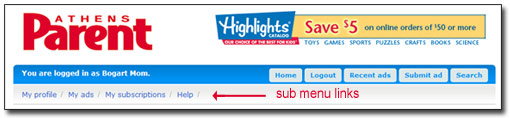
To login:
Click on the Login link in the blue menu bar. Enter
the user name you used to register and the initial password that
was emailed to the email account you provided when you registered.
If you do not see your initial password email, please check your
spam or junk folder. Once you are logged in you can change your
password by clicking on the My
profile link
on the sub menu (the sub menu will appear under the blue menu bar
once you are logged in).
To change your password:
Once you are logged in you can change your password by clicking
on the My profile link on the sub menu (the
sub menu will appear under the blue menu bar once you are logged
in).
To submit an ad:
As a security and anti-spam measure, we are requiring that
people register before submitting an ad. After you have registered
and logged in, click on the Submit ad button
on the blue bar, select an ad category and fill in the form (please
note some fields are required). Most ads will appear immediately.
To edit or delete your ad:
Log in and then click on the My
ads link in the sub menu (the sub
menu will appear under the blue menu bar once you are logged in).
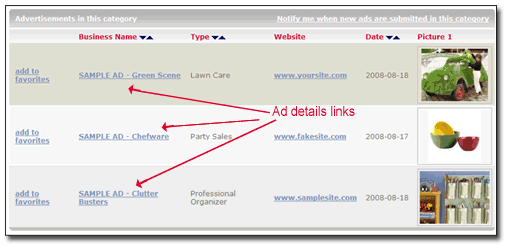
To see ad details:
To see the details of an ad within the ad list, click on the underlined
text.
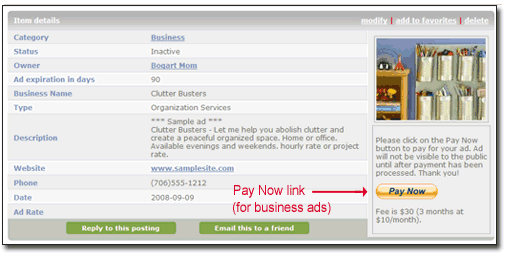
To pay for an ad - business category ads only:
Submit your ad and then open your ad and
click on the Pay Now button. You will be prompted to provide
payment information. You can pay with a credit card and payments
are processed through Pay Pal. Once your payment has been processed,
we will receive an email and if your ad contains content that
is appropriate our site, we will approve your ad and it
will become visible to the public. If your ad contains inappropriate
content, we will refund your payment and delete your ad.
You can review your ad by clicking on the My
ads link in
the sub menu below the blue menu bar (the sub menu will will
show up once you are logged in). Your ad will not appear to the
public until your payment has been processed.
To subscribe to ad category:
To receive an email notification when a new ad is submitted
in an ad category, log in and click on the ad category image
and then click on the "Notify me when new
ads are submitted in this category" link in the gray bar
above the list of ads. You need to be logged in to see the "Notify
me..." link. You can also subscribe to an RSS feed (the link is at
the bottom of page.
To unsubscribe from an ad category:
Log in and click on the My subscriptions link
on the sub-menu (the sub menu appears under the blue menu bar after
you are logged in).
|


 Join
our
Join
our